



Free Shipping:Free standard shipping on orders over $129
Returns within 30 Days
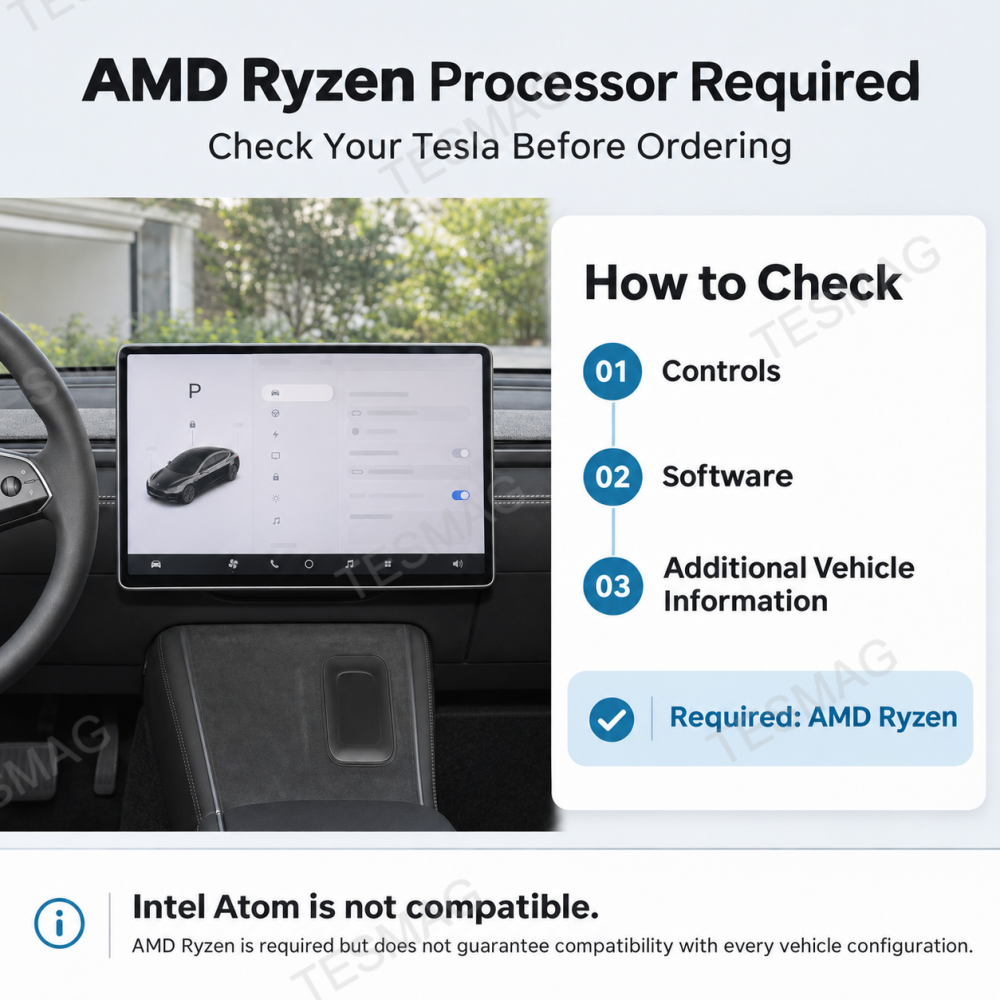
Note: This product works only with Tesla vehicles using an AMD Ryzen processor. To check your processor, go to Controls > Software > Additional Vehicle Information on your Tesla screen. If you are unsure, please contact our customer support team before purchasing.
Product Description
Bring wireless Apple CarPlay, Android Auto, and phone screen mirroring to your compatible Tesla's original touchscreen—without adding another display. This USB-powered Android 10 AI box uses Wi-Fi and the Tesla browser and supports compatible TF card media. For select Tesla Model 3/Y/S/X and Cybertruck vehicles with an AMD Ryzen infotainment processor. Check compatibility before ordering.

Key Features
Wireless Apple CarPlay for Tesla
Access the familiar Apple CarPlay interface on your original Tesla touchscreen with a compatible iPhone. Use supported navigation, music, calling, and messaging functions through a wireless phone connection, without adding a separate CarPlay display.
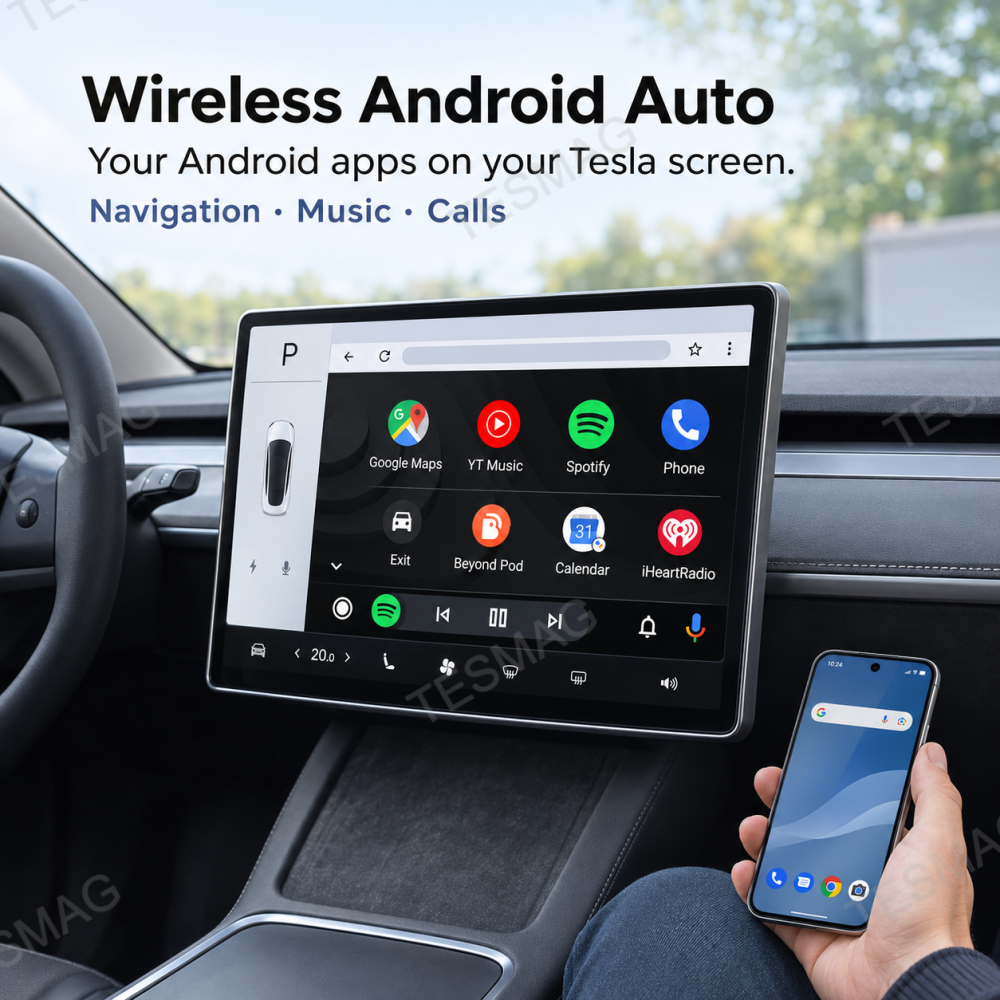
Wireless Android Auto Connectivity
Connect a compatible Android smartphone to access the Android Auto interface on your Tesla screen. Use supported apps for Google Maps, music, phone calls, and other everyday functions through a familiar smartphone-based experience.
Phone Screen Mirroring
Mirror compatible smartphone content onto your Tesla's original touchscreen. View supported photos, videos, and other phone content on the larger display while your vehicle is safely parked. Availability may vary by phone, operating system, app, and content restrictions.
Keep Your Original Tesla Touchscreen
Use CarPlay, Android Auto, and the adapter's supported functions through the Tesla web browser. There is no need to install an additional dashboard display or replace your factory touchscreen. Your Tesla's original infotainment system remains in place.
Android 10 Multimedia System with TF Card Support
The AI Box features a built-in Android 10 closed system with 2GB RAM and 8GB storage. It supports compatible local media files through a TF card of up to 512GB, with listed video decoding support for H.265, H.264, and other formats. Available apps and playback functions depend on the device's built-in software.
USB-Powered Setup Without Screen Replacement
Power the compact AI Box through a suitable Tesla USB port using the included cable and adapter. Complete the Wi-Fi, browser, and Bluetooth connection steps to access its supported functions. No replacement head unit or permanent dashboard modification is required.

Tesla Owner Pain Points & Solutions
Pain Point : You Prefer Apple CarPlay, but Your Tesla Doesn't Have a Built-In CarPlay Interface.
Solution: Bring Wireless CarPlay to Your Original Screen.
Use the AI Box to display a compatible Apple CarPlay interface through your Tesla's web browser. Keep using familiar iPhone navigation, music, and communication features without installing another display.
Pain Point : You Want Familiar Android Navigation and Music Apps.
Solution: Connect Through Wireless Android Auto
Access supported Android Auto apps through your original Tesla touchscreen. Use the familiar phone-connected interface for navigation, music, and communication instead of relying on a separate aftermarket monitor.
Pain Point : Your Phone Screen Is Too Small for Sharing Content.
Solution: Mirror Compatible Content on Your Tesla Display
The AI Box supports phone screen mirroring, allowing compatible smartphone content to appear on the larger vehicle screen. View supported photos and other content while parked, without passing your phone around.
Pain Point : You Don't Want Another Screen Cluttering Your Dashboard.
Solution: Use the Display You Already Have.
The AI Box works with your existing Tesla center touchscreen. You can add supported phone connectivity and multimedia functions without mounting a second screen or changing your dashboard layout.
Pain Point : You Don't Want to Replace Your Factory Infotainment Hardware.
Solution: Connect Through USB and the Tesla Browser.
The adapter uses USB power, Wi-Fi, and a browser-based interface rather than replacing your Tesla's original display. Follow the included instructions to complete the required connection and pairing steps.

Product Specifications & Compatibility
| Specification | Details |
|---|---|
| Product Type | Wireless CarPlay & Android Auto AI Box |
| Color | Black |
| Operating System | Android 10 (Closed System) |
| CPU | Quad-Core Cortex-A35, 1.5GHz |
| GPU | Mali-G31 MP2 |
| RAM | 2GB |
| Internal Storage | 8GB |
| Wi-Fi | Dual-Band 2.4GHz / 5GHz |
| Bluetooth | Bluetooth 5.2 |
| Power Input | Vehicle USB, 5V |
| Apple CarPlay | Wireless |
| Android Auto | Wireless |
| Phone Screen Mirroring | Supported |
| Additional Connectivity | HiCar, subject to compatible devices |
| Display Method | Tesla web browser |
| TF Card Support | Up to 512GB |
| Installation | External USB-powered device |
| Vehicle Processor Requirement | AMD Ryzen |
Vehicle Compatibility
Designed for select AMD Ryzen-equipped Tesla vehicles:
Tesla Model 3 (2020-2023.10)
Tesla Model Y (2020-2024)
Tesla Model S (2021+)
Tesla Model X (2021+)
Tesla Cybertruck (2024+)
Important Compatibility Notice
This product works only with Tesla vehicles using an AMD Ryzen processor.
To check your processor, go to:
Controls > Software > Additional Vehicle Information
Look for the infotainment processor information on your Tesla touchscreen.
If you are unsure, please contact our customer support team before purchasing.
Compatibility Requirements
The vehicle must have an AMD Ryzen infotainment processor.
The vehicle must support the required Wi-Fi and browser connection.
A compatible smartphone is required for wireless Apple CarPlay or Android Auto.
Features may vary by vehicle configuration, market, software version, and connected device.
Not Compatible With:
Tesla vehicles equipped with Intel Atom or other non-AMD infotainment processors.
Please Note: An AMD Ryzen processor is a necessary compatibility requirement, but it does not guarantee operation with every Tesla configuration. Model year alone should not be used to determine compatibility.
Installation & Connection Guide
Step 1 — Check Your Tesla's Processor
Before connecting the AI Box, confirm that your Tesla uses an AMD Ryzen infotainment processor.
Go to Controls > Software > Additional Vehicle Information on the Tesla touchscreen.
Step 2 — Connect the AI Box to USB Power
Use the included USB-C cable and adapter, as needed, to connect the AI Box to a suitable powered USB port in your vehicle.
Check the device's status indicator and follow the supplied manual to confirm that it has powered on.
Step 3 — Connect to the AI Box Wi-Fi
Open your Tesla's Wi-Fi settings and locate the network beginning with H-BOX.
Connect using the Wi-Fi password provided in the instruction manual.
If available, use the Remain Connected in Drive Wi-Fi setting according to your vehicle's instructions.
Step 4 — Open the AI Box Interface
Launch the Tesla web browser and enter:
Follow the displayed instructions to access the AI Box interface. The first connection may include an initial display adjustment.
Step 5 — Complete Bluetooth and Smartphone Pairing
Follow the included manual to connect the required Bluetooth devices. The adapter's Bluetooth name may begin with H-Car.
Complete the pairing prompts on your vehicle and compatible smartphone. Configure the appropriate audio connection as instructed.
Step 6 — Select Your Preferred Function
Once setup is complete, select the supported CarPlay, Android Auto, mirroring, or built-in media interface.
To return to regular Tesla functions, use the vehicle's normal touchscreen controls.
Important Installation Notes
Complete the initial setup while safely parked.
Wireless phone connectivity does not eliminate the AI Box's USB power requirement.
The Tesla browser connection is separate from native Tesla software functionality.
Interface behavior and audio routing may vary with device firmware, smartphone, and vehicle software.
Keep the device and its cable away from pedals, seat tracks, and other moving components.
Follow applicable traffic laws and never watch video while driving.
📦 What's in the Box?
1 × Wireless CarPlay & Android Auto AI Box
1 × USB-C Cable
1 × USB-C Adapter
1 × User Manual
Not Included: Smartphone, Tesla vehicle, or TF memory card.
Frequently Asked Questions
Q: Will this Wireless CarPlay AI Box work with every Tesla Model 3, Y, S, X, or Cybertruck?
A: No. This adapter is intended for select Tesla vehicles equipped with an AMD Ryzen infotainment processor.
Q: How do I check whether my Tesla has an AMD Ryzen processor?
A: On your Tesla touchscreen, go to Controls > Software > Additional Vehicle Information.
Look for the infotainment processor entry. It must indicate AMD Ryzen.
If you cannot confirm the processor type, contact our customer support team before ordering.
Q: Does this adapter install native Apple CarPlay or Android Auto into Tesla's operating system?
A: No. This is a third-party external AI Box that uses a Wi-Fi connection and the Tesla web browser to display compatible CarPlay and Android Auto interfaces.
Q: Does wireless CarPlay mean I don't need any cables?
A: No. Your compatible iPhone or Android phone connects wirelessly to the adapter, but the AI Box still needs USB power from the vehicle.
The package includes a USB-C cable and USB-C adapter for the device connection.
Q: Can I mirror my phone screen to the Tesla touchscreen?
A: Yes. The AI Box supports phone screen mirroring for compatible smartphone content.
Mirroring availability can depend on your phone, operating system, app, and content protection requirements. Some streaming services and copyrighted videos may restrict screen mirroring.
Video viewing should only take place while the vehicle is safely parked.
Q: Can I use CarPlay or Android Auto without my phone?
A: No. Wireless Apple CarPlay requires a compatible iPhone, while Android Auto requires a compatible Android smartphone.
The AI Box also includes a separate Android 10 closed system for its supported built-in functions. Online services may require an internet connection.
Q: Does this AI Box support TF cards and local video playback?
A: The device supports TF cards up to 512GB and lists decoding support for compatible video formats, including H.265, H.264, VC-1, MPEG, and VP8.
Actual playback depends on file format, encoding, and the built-in media software. A TF card is not included.
The Android 10 closed system does not guarantee the ability to install arbitrary apps or run every streaming service.
Q: Will the AI Box replace or interfere with my Tesla's original touchscreen functions?
A: The AI Box is an external accessory. It displays its interface through the Tesla browser and does not replace the original vehicle operating system.
Shipping time depends on the product.
Free shipping on all orders $129+ worldwide!
For all orders under $129, the shipping fee is $5
| Product Type | Handling Time | Shipping time |
| Fast Shipping Products | 0-1 calendar days | 4-12 calendar days |
| Standard Products | 1-2 calendar days | 6-12 calendar days |
| Customized Products | 3-5 calendar days | 10-16 calendar days |
We will make every effort to deliver your package ASAP. However, additional time may be required due to invalid addresses and custom clearance issues. We have many cooperative express companies, such as DHL, FedEx, UPS, and USPS. We will choose the most suitable mode of transportation for you according to your country.
If the product is a customized product and in production, no refund or return without quality problems. After we receive your return, our quality assurance team will check your return. After the inspection is complete, our customer service representative will process your return refund or assist you in placing a replacement order for a replacement.
Damages and Issues:
If your product arrives damaged, or you receive the wrong product, please email us immediately at contact@teslaacessories.com with clear pictures of the damaged or incorrect product. We will review it in 1 business day and upon approval, we will dispatch a brand new replacement. Your 100% satisfaction is important to us.
Return Qualification Requirements:
1). Orders exceeding 1 month do not accept return or exchange of goods.
2). Orders only accept return or exchange of goods within 30 days.
3). No return or exchange on customized products(eg., Yoke Steering Wheel)
Refund instructions:
You will be responsible for paying the freight of the returned goods, as well as the possible customs duties and other expenses. Freight is nonrefundable. If you receive a refund, the return freight will be deducted from your refund.
For an item to be eligible for a return, it must remain in the condition it was received: unused, unworn, tagged, and in its original packaging.
Prior to initiating a return, please reach out to us at contact@teslaacessories.com. You can expect a response from us within 1 business day. Once your return is accepted, we will share detailed instructions for your return process. Please provide us with the tracking number and your order number once the return shipment has been arranged.
Upon receiving and verifying that the returned product adheres to our return conditions, we will commence your refund process within 1 business day using your original payment method. Be advised that all refunds may take up to 2 business days to process once we receive the returned item.Returns sent without prior approval will not be accepted.
Refunds & Order Cancellation
Please note that if you request a refund due to personal reasons after placing an order, a 5% transaction fee will be deducted from the refund amount. This fee is charged by the payment processor, not TESMAG. Therefore, the actual refund received will be less than the original payment amount.
To avoid any inconvenience or loss, we kindly ask you to double-check your order before completing the purchase. Mistakenly placed orders may incur this additional fee, so we encourage careful attention during checkout.
Return Fee
If a return is due to a product being “damaged or shipped incorrectly,” the customer does not need to pay the return shipping fee. If a return is due to “purchasing the wrong item or no longer needing it,” the customer is responsible for the return shipping fee, and the actual shipping cost will be deducted from the refund. In either case, no restocking fee will be charged for the return.
If a package is missing parts or has incomplete contents, the seller will reship the missing items based on the actual situation. If the buyer does not agree to a reshipment and chooses to return the item, the buyer is responsible for the return shipping costs.
Non-Returnable Items:
Steering wheels, seat covers, and gift cards are custom-made and special-order items; returns are not accepted. If you have any questions about specific products, please contact us.
It is essential to ensure accuracy when filling out the return address. Please be aware that we cannot be held responsible for any returns that are lost or misdirected due to incorrect address information.
If due to our reasons, the goods received are damaged or not correct, the consumer is not required to bear the shipping fee for this reason.
Should you have any queries regarding returns and refunds, please don't hesitate to reach out to us at contact@teslaacessories.com.
Načítavanie
