
Introduction
On Monday, July 13, 2026, Tesla officially initiated the rollout of its highly anticipated Over-the-Air (OTA) software update, version 2026.20.6.6, carrying the internal neural network designation of Full Self-Driving (FSD) v14.3.5. While point releases in Tesla’s operating system framework often serve as minor bug-fix compilations, this specific deployment marks a monumental shift in how the vehicle shares visual perception telemetry with its human operator.
For years, the camera feeds processing Tesla’s advanced spatial neural networks have remained a “black box” to the average driver. FSD visualizes the world as a synthetic vector space—bounding boxes, localized lanes, and kinetic path predictions rendered on the central touchscreen. While mathematically impressive, this abstraction layer often detached the driver from the raw optical realities perceived by the car's physical CMOS sensors.
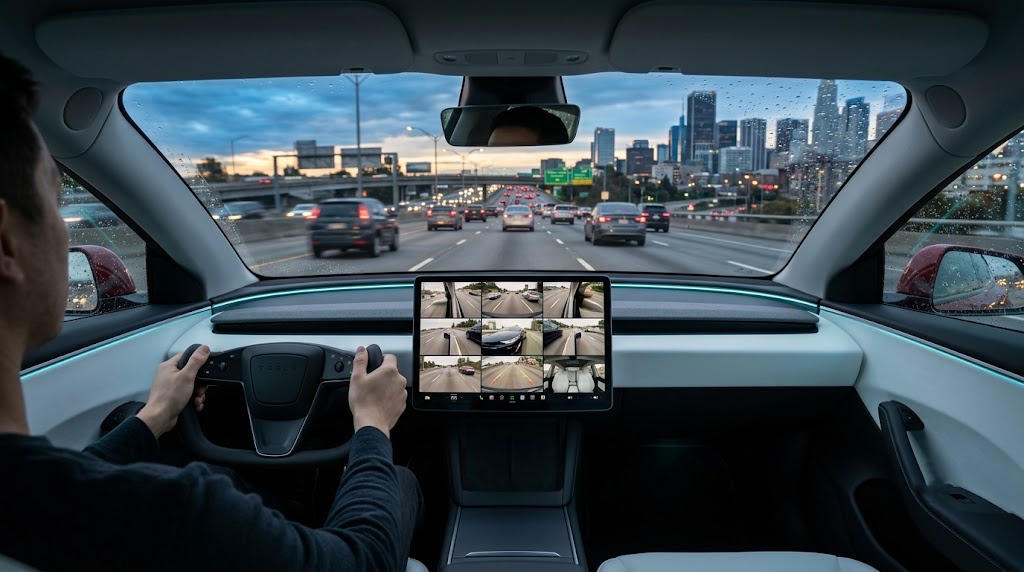
With FSD v14.3.5, Tesla introduces a major feature update: Active Camera Preview. For the first time in Tesla's history, owners can monitor, view, and isolate every single external and internal camera stream in real-time, even while the vehicle is cruising autonomously on highways or complex urban arterials. This analytical deep dive unpacks the architectural mechanics of this new software upgrade, explores its foundational hardware constraints across Hardware 3 (HW3) and Hardware 4 (HW4) systems, and provides practical insights for modern EV owners.
II. Technical Breakdown of FSD v14.3.5 & Active Camera Preview
To understand the significance of this software release, one must first explore the system's digital pathways. Previously, the "Camera Preview" application, which displays a consolidated visual grid of the car’s cameras, was strictly gated by safety interlocks. It could only be accessed when the transmission was set to "Park". If the driver shifted into "Drive" or "Reverse," the system immediately terminated the multi-view application, defaulting to the standard visualizer and the single, mandatory rear-facing backup camera.
Under the architecture of FSD v14.3.5, this safety lock has been completely re-engineered. Drivers can access the system at any time by navigating to:
Controls > Service > Camera Preview
The Nine-Box Spatial Grid
Upon activation, the central processor renders a high-definition 9-box grid overlay on the right-hand quadrant of the display. This grid populates in real-time with zero noticeable frame-rate lag, pulling directly from the vehicle’s physical camera array:
|
Camera Position |
Sensor Type |
Field of View (FoV) |
Primary Autonomous Function |
|
Front Main Camera |
Triple-Lens System (HW3) / Dual-Lens (HW4) |
120° Horizontal |
Long-range pathing, highway object detection |
|
Front Wide Camera |
Wide-Angle Lens |
150° Horizontal |
Intersection crossing, close-quarters obstacle detection |
|
Front Bumper Camera |
Ultra-Wide Macro (2025+ Model Y / Cybertruck) |
180° Horizontal |
Eliminates front blind-spots, low-height curb detection |
|
Left Side Repeater |
Fender-mounted Rearward Facing |
80° Diagonal |
Blind-spot monitoring, highway lane merges |
|
Right Side Repeater |
Fender-mounted Rearward Facing |
80° Diagonal |
Blind-spot monitoring, highway lane merges |
|
Left B-Pillar Camera |
Door-pillar Forward Facing |
90° Diagonal |
Cross-traffic analysis, unprotected left turns |
|
Right B-Pillar Camera |
Door-pillar Forward Facing |
90° Diagonal |
Cross-traffic analysis, unprotected left turns |
|
Rear-View Camera |
Liftgate-mounted |
140° Wide Angle |
Reversing, rear-end hazard mitigation |
|
Interior Cabin Camera |
Rearview-mirror integrated |
Wide Infrared |
Driver monitoring, occupant safety, cabin security |
Individual Expansion Logic
The UI allows the driver to tap on any of these nine active thumbnail feeds. Doing so instantly scales that specific stream to a larger, dedicated viewing block while maintaining a minimized grid of the remaining eight feeds along the margins. Tapping a dedicated "Grid" button instantly snaps the display back to the uniform, multi-stream configuration.
Underlying Network Compiler Upgrades (MLIR & C++)
What makes active previews technologically viable without degrading FSD path-planning latency is a ground-up rewrite of Tesla’s internal compiler. Previously, rendering video feeds was processed sequentially through standard graphics pipelines, which risked memory-bandwidth starvation when the main FSD neural network was executing at 36 Hz (36 frames of prediction per second).
By implementing an MLIR (Multi-Level Intermediate Representation) compiler framework, Tesla's software division has decoupled the vision-perception pipeline from the visual-display pipeline. FSD v14.3.5 enjoys a 20% acceleration in core model reaction times because the compiler now prioritizes inference compute kernels over standard UI rendering operations. In simpler terms, your Tesla can now paint a high-fidelity 9-stream video on your screen without sacrificing a single millisecond of its autonomous braking, steering, or decision-making capabilities.
III. Hardware Compatibility: HW4 vs. Legacy HW3 (FSD v14 Lite)
While the active camera preview operates flawlessly on HW4-equipped vehicles (possessing superior central processing units, dedicated graphics buses, and higher-megapixel cameras), legacy Hardware 3 (HW3) owners face a different architectural reality.
The HW3 Bandwidth Bottleneck
Vehicles equipped with HW3 run on a platform engineered in 2018. While incredibly capable, the SoC (System on Chip) features significantly lower memory bandwidth and a much tighter thermal envelope. Because FSD v14 introduces complex, deeply parameter-rich vision models, HW3 cannot natively process the full, uncompressed weights of the network.
To resolve this, Tesla developed FSD v14 Lite specifically for HW3 cars. This "Lite" version utilizes INT8 quantization and selective weight pruning to match the functional output of HW4 networks without triggering system-wide memory overflows.
Active Preview Constraints on HW3
When an HW3-equipped Tesla Model 3 or Model Y activates Active Camera Preview during autonomous driving, the system dynamically scales down the preview frame rates:
-
HW4 Vehicles: All 8 or 9 camera streams render at a fluid 30 frames per second (fps).
-
HW3 Vehicles: The system throttles the Active Camera Preview display to 15 fps.
This throttling is intentional. It preserves the vital processing cycles required for real-time risk mitigation. Additionally, HW3 vehicles do not possess the Front Bumper Camera, resulting in a 3-by-3 grid with one inactive tile.
Despite these compromises, user feedback from the first wave of HW3 rollouts indicates that FSD v14 Lite exhibits exceptional stability. Lane-centering has been noticeably smoothed, and the annoying "camera degradation" alerts historically common during night driving have been substantially reduced due to upgraded noise-reduction algorithms integrated into the v14 vision pipeline.
IV. Practical Real-World Use Cases for Daily Drivers
Having an active nine-camera matrix on your dashboard is far more than a visual novelty. For Tesla owners in both North America and Europe, this feature resolves several long-standing daily driving pain points.
1. Enhanced Cabin & Passenger Monitoring
For parents traveling with young children, infants, or pets in the rear seats, the Interior Cabin Camera is now a powerful tool. Instead of relying on physical back-seat mirrors (which are often poorly aligned and can degrade night-time visibility), drivers can keep a dedicated, high-contrast infrared feed of the back seat active on the right side of the screen. Because the cabin camera utilizes invisible infrared emitters, it provides crystal-clear visibility even during zero-light highway drives.
2. Low-Visibility Blind Spot Audits
Although Tesla’s standard blind-spot camera feature activates a feed when turning on your turn signal, it only displays a single side view. With FSD v14.3.5 Active Preview, a driver merging into complex multi-lane highway systems can continuously view both B-pillar and side repeater feeds simultaneously. This is exceptionally helpful when navigating narrow European roundabouts or during heavy rains where water droplets on side windows distort physical side-mirror views.
3. Precision Towing and Hitching Alignment
For Model Y or Cybertruck owners towing small campers, utility trailers, or bike racks, the rear-view camera and bumper camera feeds can now remain persistently on. This allows drivers to monitor hitch security, trailer sway, or loose cargo ties in real-time at full highway speeds, without having to shift into reverse to force-trigger the camera.
4. Curbside Guarding
Navigating tight parallel parking spaces in congested European cities like Paris, Munich, or London often results in "curb rash" on expensive alloy wheels. By expanding the side-repeater views or the new front bumper camera (on equipped models) during tight maneuvers, drivers can visually verify their distance from stone curbs with millimeter precision, supplementing the ultrasonic or Tesla Vision distance warnings.
V. Impact on Autonomous Driving Perception & Trust
From a psychological perspective, Tesla’s decision to unlock these raw video feeds while in motion represents a significant shift in corporate philosophy. Historically, Tesla restricted access to these cameras to prevent driver distraction and mitigate legal liabilities.
Demystifying "Phantom Braking"
By offering real-time visibility, Tesla is building transparency with its user base. When FSD performs a sudden, unexpected speed reduction (popularly known as "phantom braking"), or shifts slightly in its lane, a driver can now immediately look at the active camera grid to see exactly what the car's computer saw. If a B-pillar camera was temporarily blinded by direct, low-angle sunlight, or if the wide front camera caught a flickering shadow from an overpass, the visual feedback helps the driver understand the system's "thought process."
Regulatory Alignment
The opening of these feeds also signals Tesla’s confidence in its hardware’s visual fidelity. European regulators (under the UNECE framework) have historically expressed skepticism regarding pure-vision autonomous systems. Providing drivers and potential regulatory auditors with direct, low-latency access to the vehicle's optical inputs helps demystify Tesla Vision's reliability in dense, complex European driving environments.
Conclusion
FSD v14.3.5 (2026.20.6.6) proves that Tesla is committed to refining both the functional capability of its autonomous driving suite and the qualitative user experience of the human inside. The Active Camera Preview is a massive leap forward in trust, safety, and operational utility. While HW3 owners must navigate the hardware limitations of a legacy processing platform, the software optimizations of the MLIR compiler ensure that every Tesla owner continues to benefit from the absolute cutting edge of automotive artificial intelligence.
FAQ
Q: Can I use Active Camera Preview if I do not have FSD (Supervised)?
A: Yes. While the feature is bundled with FSD v14.3.5 updates, the Camera Preview function can be activated under the Service menu on any Tesla running the 2026.20.6.6 firmware, regardless of whether you have active FSD or basic Autopilot.
Q: Does running the active 9-box grid drain more battery?
A: The battery drain is negligible. The rendering is handled by the infotainment processor’s GPU, which operates on milliwatts of power relative to the high-voltage traction battery powering the motors.
Q: Can I record these live previews directly to my USB drive?
A: The Dashcam and Sentry Mode systems continue to record their standard designated channels in the background. The Active Camera Preview UI does not modify how files are written to your USB drive; it is purely a real-time monitor.
Q: Is the interior cabin camera feed secure? Does Tesla upload this video?
A: No. The live stream of the cabin camera displayed on your touchscreen is processed entirely locally on the car's computer and is not transmitted to Tesla's cloud servers, respecting occupant privacy.
Q: Does the 9-box grid disappear automatically if I shift gears?
A: Unlike previous software versions, where shifting into drive immediately killed the camera preview, the grid in 2026.20.6.6 remains persistent until you manually close it by tapping the "X" icon or swipe it away, regardless of your gear or driving state.